

Highlights
- Jurojin Poker is a Windows multi-table software with a fully free mode for micro-stakes players (up to NL10 / MTT $5 / $2 Spins).
- Core features include Real-Time HUD Overlays, an Automatic Table Manager, a customizable Hotkey System.
- Paid plans start from $4.16/month (billed annually), with a full-access option at $25/month.
- Compatible with major poker rooms including PokerStars, GGPoker, PartyPoker, Winamax, and more.
If you’re searching for an honest Jurojin Poker review, you’ve landed in the right place. Multi-tabling is one of the most reliable ways to increase your win rate in online poker, but doing it without the right tools turns every session into a chaotic balancing act.
This review covers everything: features, pricing plans, supported poker rooms, honest pros and cons, and a direct answer on whether Jurojin is worth it for your specific situation.
Ready? Let’s go!
What Is Jurojin Poker?
Jurojin Poker is a multi-table management software designed to give you full control over your multitabling setup.
The software is developed by an international team and has built a growing reputation in the MTT and cash game communities, particularly among players making the jump from recreational grinding to structured, volume-focused play.
What Do You Get With Jurojin?
With Jurojin, you get access to four core feature modules, each targeting a specific part of what makes multitabling difficult. Here’s what each one does in practice:
1) Real-Time HUD Overlay
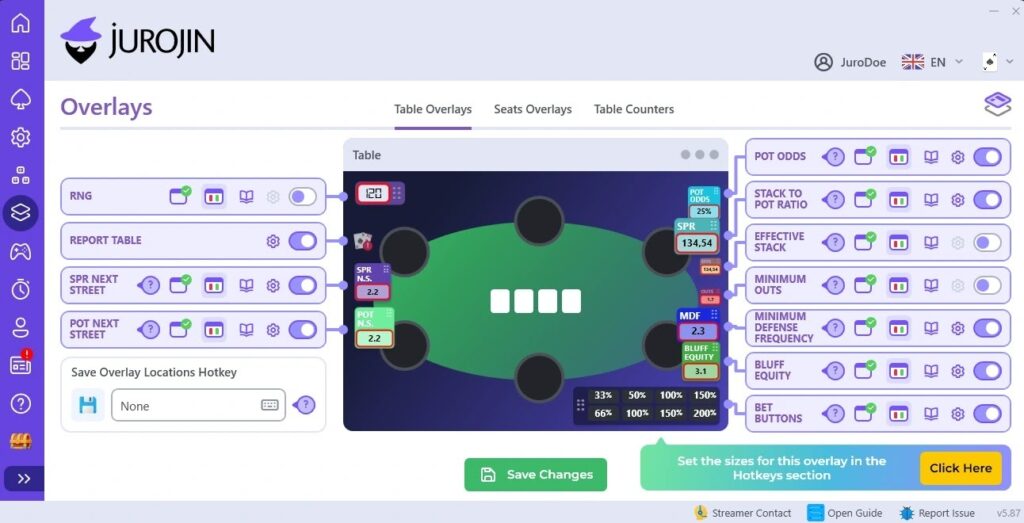
The Heads-Up Display delivers live table data directly on your screen as hands play out. You can see Pot Odds, SPR (Stack-to-Pot Ratio), Effective Stack, and a full Actions History Line showing every player’s decisions in the current hand.
You also get a Positions Overlay, which is great when you play multiple tables and switch your view among them. Outside of micro-stakes free mode, the HUD is limited to one table unless you’re on a paid Overlays plan.
2) Automatic Table Manager
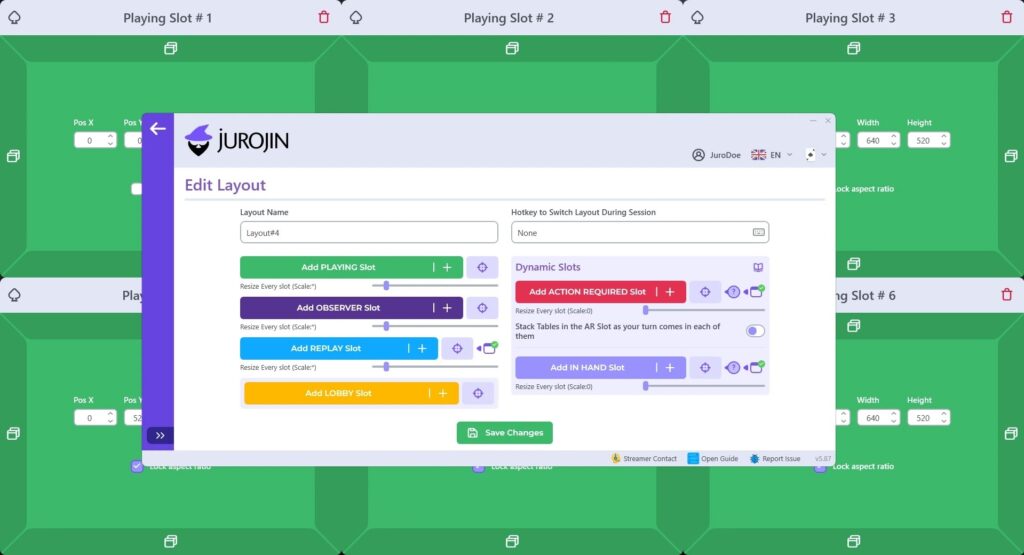
The Table Manager is Jurojin’s premiere feature. When a new table opens, Jurojin automatically places it in your layout instead of leaving you to drag and resize windows by hand.
You can build static grid layouts or set up dynamic slots that bring a table into focus when it’s your turn to act, so you stay sharp where most needed even when running six or more simultaneously.
For anyone who’s tried multi-tabling without dedicated tiling software, this alone changes the experience significantly.
3) Hotkey System
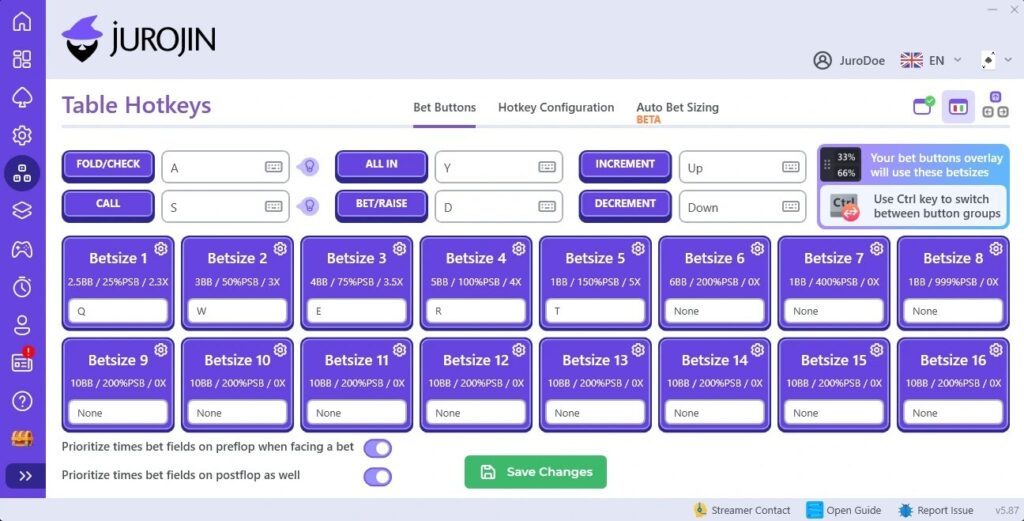
Jurojin’s Hotkey System lets you bind bet sizes and poker actions to your keyboard, mouse buttons, or a Windows game controller. You can configure preflop and postflop bet sizes by position, set raise multipliers against villain bets, and execute actions instantly.
At four or more tables, hotkeys become a necessity. Having your standard bet sizes and actions mapped to a single key reduces decision lag and keeps your pace consistent across every table open on your screen.
4) Session Tracker
The session stats layer gives you a live read on key metrics as your session runs, pot odds at each decision point, stack depth in big blinds, and positional context across all active tables. It keeps the numbers you need for fast in game decisions visible.
Be aware, it’s not a replacement for dedicated hand history software like PokerTracker or Hold’em Manager, those are better for post-session review and long-term database analysis.
Jurojin Pricing — And How To Save On Your Subscription
Jurojin’s pricing is modular, which means you only pay for the features you actually use. Here’s a breakdown of every current plan, priced on the annual billing cycle:
| Plan | Monthly Price (Annual) | What It Covers |
| Free | $0 | All features at micro-stakes (NL10 / MTT $5 / $2 Spins). |
| Hotkeys | $5.83/month | Custom hotkeys on every table. |
| Ignition / Bodog | $4.16/month | Full comfort features for Ignition and Bodog. |
| Overlays | $12.50/month | Full HUD overlay on every table. |
| Tiling | $12.50/month | Full tiling engine, focus management, dynamic slots. |
| Full Access – Low Stakes | $7.50/month | All features up to NL50 / MTT $22 / $10 Spins. |
| Full Access – Unlimited | $25/month | All features, all stakes, including ClubGG. |
What Poker Rooms Does Jurojin Support?
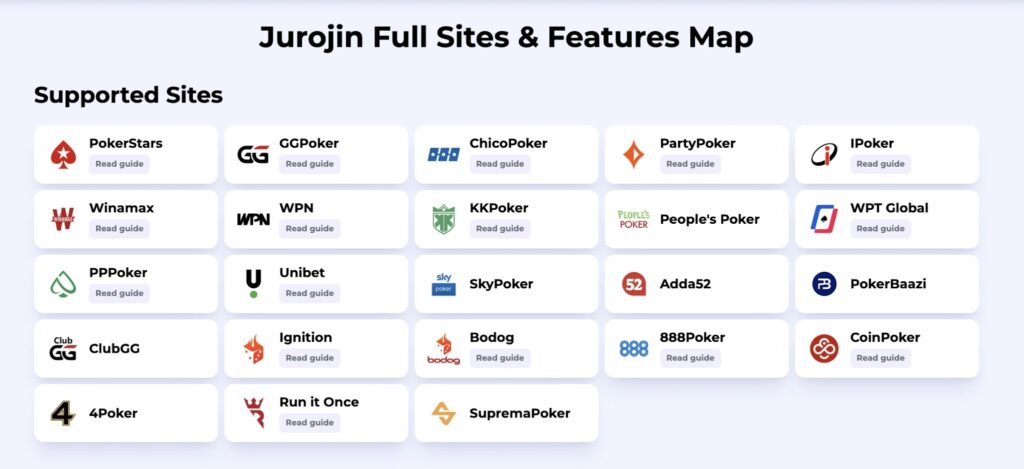
Jurojin supports the following poker rooms:
- PokerStars
- GGPoker
- PartyPoker
- iPoker
- Winamax
- WPN (Winning Poker Network — Americas Cardroom, Black Chip Poker)
- KKPoker
- ChicoPoker
- Ignition / Bodog
- PP-Poker
- ClubGG (Full Access – Unlimited plan only)
Feature availability varies by room. You can check the full compatibility breakdown on the Jurojin supported sites guide.
Jurojin Pros And Cons
Here’s a breakdown of Jurojin’s strengths and weaknesses:
| Pros | Cons |
| Fully free for micro-stakes and no credit card required. | Windows only, no Mac support. |
| Modular pricing: pay only for what you use. | ClubGG requires the most expensive plan. |
| Supports most major poker rooms. | No built-in hand history database. |
| Dynamic tiling with action-required focus management. | Initial setup has a learning curve, however the features are easy to navigate. |
| Active development team with regular updates. |
Is Jurojin Worth It?
Yes, Jurojin is worth it if you’re playing more than two tables regularly and want to stop losing time and focus. The free tier makes it risk-free to test as you can run a full micro-stakes session with tiling, hotkeys, and overlays before spending anything.
For players moving up from NL10 to NL25 or NL50, the Full Access – Low Stakes plan is a straightforward upgrade at $7.50/month. It removes every meaningful limitation at the stakes where most grinders are building their volume.
The software won’t improve your poker theory but it will let you play more hands per hour at the same level of attention, which is the entire value proposition.
== The next step is to download Jurojin for free, no credit card required and full access at micro-stakes to test it in a real session. ==
Jurojin Poker Review FAQ
How Much Does Jurojin Cost?
Jurojin Poker is free for Micro Stakes (NL10 / MTT $5 / $2 Spins), with some feature restrictions even at that level. Paid plans start at $4.16/month for the Ignition/Bodog bundle (billed annually).
The most popular option for players moving beyond micro-stakes is the Full Access – Low Stakes plan at $7.50/month, which covers all features up to NL50. The Full Access – Unlimited plan runs at $25/month and includes every feature at every stake, including ClubGG.
Does Jurojin Offer A Free Trial?
Yes, Jurojin offers a free trial that gives you access to all features at any stake level, with certain functional restrictions above micro-stakes.
Outside of micro-stakes, overlays and hotkeys are limited to one table, and tiling is limited to two tables. This is enough to evaluate whether the full version fits your workflow before subscribing.
Is There A Jurojin Discount Code Available?
No permanent discount code is currently available, but Jurojin publishes promotions and giveaways on their Instagram.
Following that account before you subscribe is the easiest way to catch a deal. Annual billing already includes a 17% discount compared to monthly plans, which is the most reliable saving available right now.
Does Jurojin Work On Mac?
No, Jurojin currently runs on Windows 10 and Windows 11 only. Windows 7 and 8 are no longer supported. There is no Mac version available at the time of this review.
Does Jurojin Work On PokerStars?
Yes, Jurojin does work on PokerStars, and it’s one of the most fully supported rooms in the software. You can use the full HUD overlay, table tiling, and hotkey system on PokerStars tables.